
CONSTRUCTION. SERVICE. CONTROLS. ONE AI WORKSPACE.
EquipTalkIQ: AI for mechanical contractors across construction, service and controls.
Know the building.Ask it anything.
Specs, drawings, equipment, service history, dispatch and live controls in one assistant.
Every answer comes with the records it used.
CONNECTED BY DESIGN
Keep your tools. Connect the context.
Typed, tested mappers turn ServiceTitan and ServiceTrade records into the app’s service model; live sync and every other connection are scoped per customer by Axiom Routing. No live source-system feed is enabled in the demo.
THE WORK IS CONNECTED. YOUR INTELLIGENCE SHOULD BE TOO.
A closer look at the whole picture.
Not one more place to store the work. A way to connect the people, evidence, and decisions already inside it.
EQUIPMENT & SITE INTELLIGENCE
Every unit.
Its entire story.
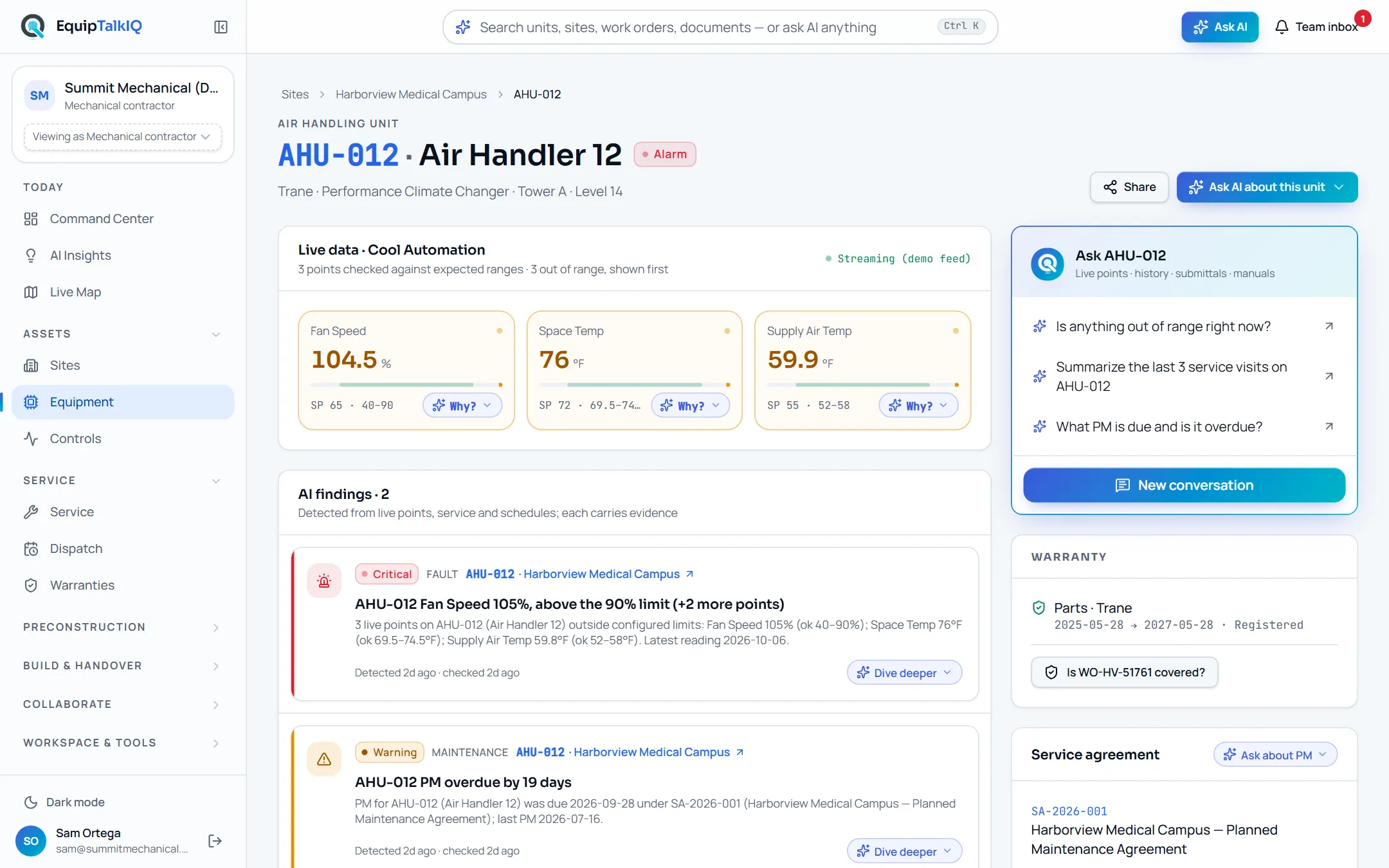
The manual knows the design. The service record knows the history. The agreement knows the scope. Each unit carries its live points, AI findings with evidence, warranty, agreement and documents on one page, with an Ask menu of questions about that unit and a conversation that remembers. Step back to the site or the whole portfolio without leaving the work.
- Ask menus with context questions on every record
- Findings with Evidence · n, warranty, agreement and PM status
- Sources under every answer, share with a task
MECHANICAL ESTIMATING & DRAWING EVIDENCE
From linework
to a better takeoff.
Give quantities a foundation you can inspect. Calibrated PDF geometry, AI recognition proposals, legend and schedule cross-checks, and review states across HVAC, piping, plumbing and controls. Upload the next revision and Revision Compare matches every sheet to its prior version, overlays them and lists the changes. Automated accuracy remains an estimator-validated capability, not a promise of hands-off results.
- Counts, lengths, areas, and drawing provenance
- AI proposals with estimator review; sized duct and pipe networks
- Revision Compare: sheet matching, overlay, change list

SPECLENS: SPEC REVIEW AI & SUBMITTALS
The requirement.
The source.
The next question.
Upload a spec set once. SpecLens reads every page, turns requirements into rows, writes the submittal log with every line tied to the paragraph that requires it, tracks what addenda and revised specs change, and drafts RFIs and QA/QC checklists with their citations. Ask a question and the answer quotes section, page and paragraph, and says when the addendum superseded the base spec.
- Cited answers with verified quotes; “not in the documents” is a valid answer
- Submittal log with type flags and an .xlsx export
- Addenda tracking, RFI and QA/QC drafts you approve

Knowledge that travels.
Share a record or AI answer with context, priorities, replies, and follow-up tasks. GC asks and rep requests land in the same team inbox.
Explore team collaborationA handover worth keeping.
Equipment, manuals, warranties, training, and service information. Organized for the people who will run the building next.
Explore the owner viewAGAINST DOCUMENT-ONLY TOOLS
Everything a document tool does before award. Then the part they can’t do.
Spec review AI and document-intelligence products for MEP contractors answer questions from drawings and specs, compare revisions and keep submittal logs. They are good at it, and they stop when the job is won. EquipTalkIQ matches that preconstruction work and carries the same record into construction, turnover, service, dispatch and controls.
“Available” means you can use it in the app today. “Coming” means it is being built now and is not in the demo yet. Demo telemetry and map movement are simulated; live source-system feeds are scoped per customer.
INTELLIGENCE THAT TRAVELS
Ask. Understand.
Bring the team.
From a question at the unit to a conversation that moves the work forward.
Not a chatbot. The unit’s own assistant.
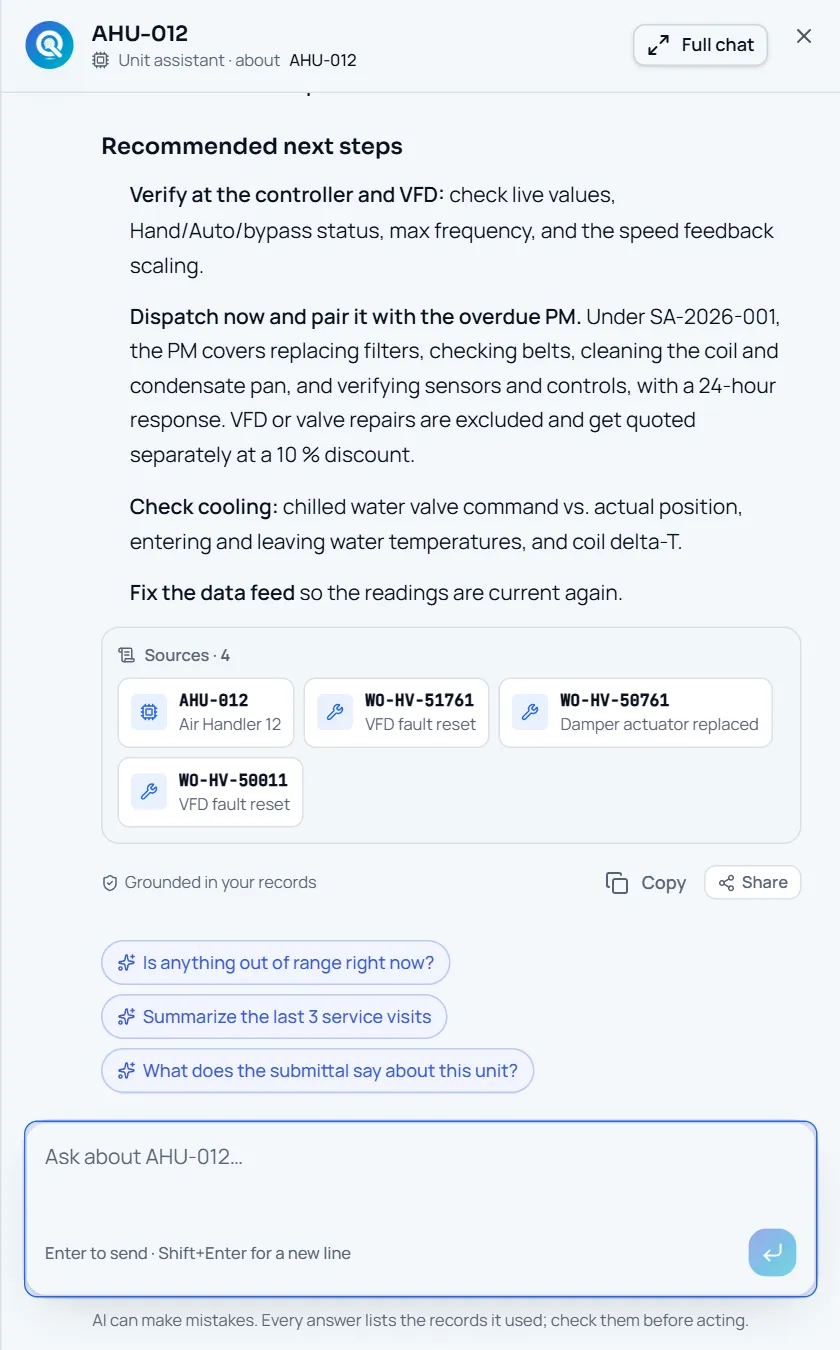
Every Ask button is a menu of questions about the record you are on, plus “Open chat about this”. The assistant retrieves service history, agreements, warranties and documents through scoped tools and ends with a Sources strip naming the records it used.
- Ask menus with 2–5 context questions on every page
- Working summary, then the answer, then Sources · n
- Follow-up chips and “Grounded in your records”
Captured app screens with sample records. No external message is sent.
THE OPERATION, IN FOCUS
More than an answer. A way forward.
A useful insight should lead back to the people, plans, and assets that can act on it.
A portfolio when you need it. A single unit when you don’t.
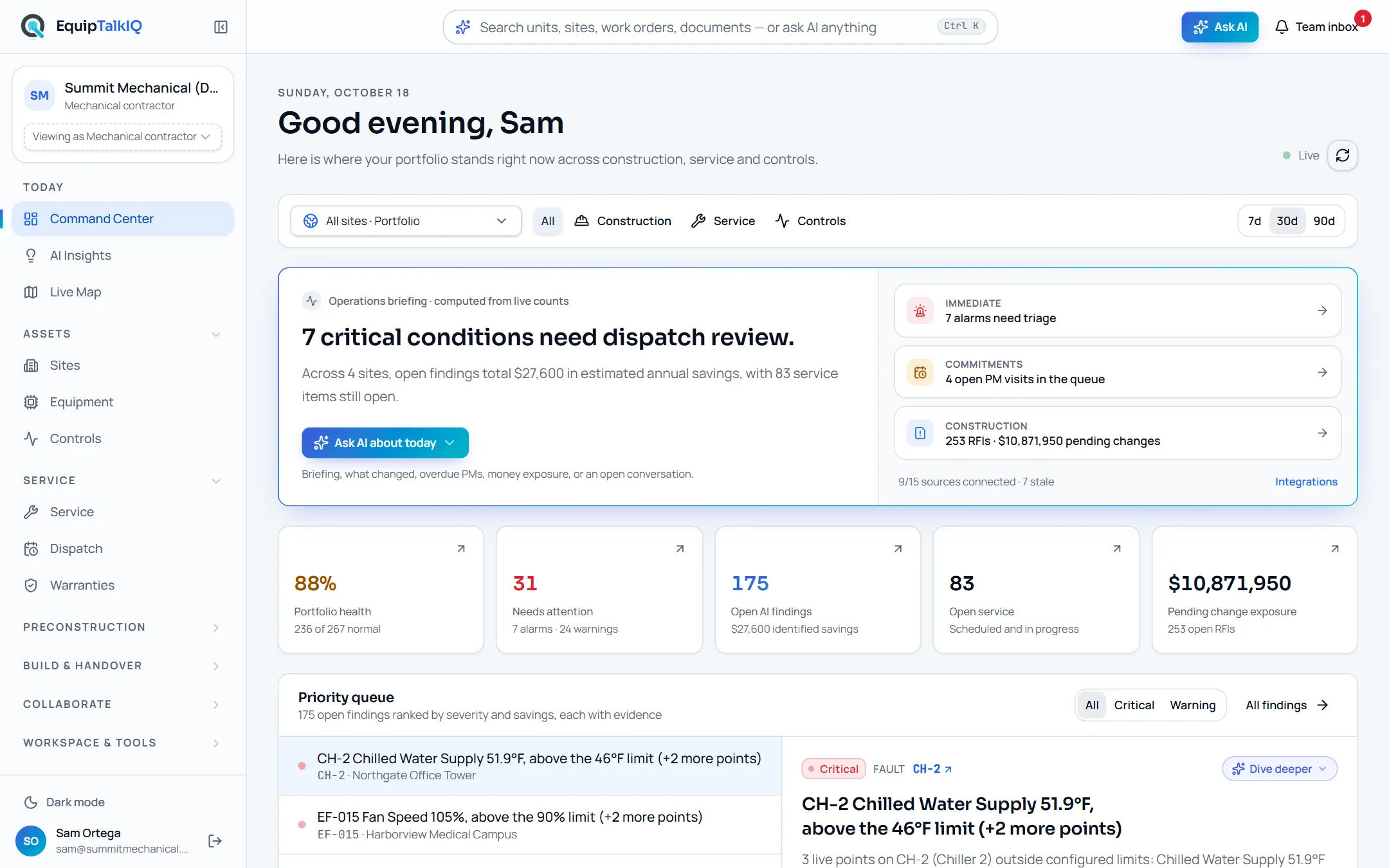
Go from your sites to equipment, from a VRF outdoor unit to its indoor units. Combine construction, service and controls focus. The briefing is computed from live counts; the priority queue ranks findings by severity and savings, each with its evidence.
- Site and equipment drill-downs in the URL
- Priority queue with Evidence · n
- One Ask bar and ⌘K for search or a portfolio question
RECEIPTS BEFORE CONFIDENCE
How the AI earns trust.
Every claim below is a component in the product, not a promise in the copy.
Read the whole pageSources on every answer
Answers end with the records they cite: units, work orders, documents, spec sections and emails, as cards that open in the app. A record that is not cited in the answer does not appear.
Evidence on every finding
Insights are detected, not written. Each finding carries the record ids behind it, and AI site briefs that mention numbers absent from the findings are dropped.
Computed is labelled computed
KPIs, briefings, plan risks and takeoff quantities come from SQL and tested math. Only things a model produced carry the AI colour.
One tenant per company
Every business table carries the company, row-level security checks membership, and the AI reads with the caller’s own token.
One assistant per audience
Owners, GCs and reps get their own assistant over their own projection of the data, with no tools into the contractor workspace.
Every model call is metered
Each call is priced at list and attributed to a person, feature and record. Admins see the breakdown and set a monthly budget with a warning and a hard stop.
ONE BUILDING. DIFFERENT RESPONSIBILITIES.
A shared picture. Thoughtful boundaries.
Contractors, reps, owners, and GCs see the work they need. Their AI uses the context they’re allowed to access, not somebody else’s private information.
Collaboration without
the information free-for-all.
Give reps a room with the equipment schedule, submittals and site visits. Give GCs a project workspace with tracked asks. Give owners the equipment and maintenance context. Keep internal costs, margins, and private notes out of the wrong conversation.
- Account-specific AI context
- Room, project, and package access
- Intentional sharing instead of broad access
The right information.
The right boundary.
Only this company’s accessible records.
Editorial sample. This switch does not change real permissions or call AI.
WHO IT’S FOR
One building. Four views. No shared secrets.
Account type is chosen at sign-up and decides the navigation, the pages and the assistant. Owners never see contractor pricing; GCs never see labor or rates; reps see their rooms and submittals. Each assistant reads only its own audience’s data.
Mechanical contractors
Service, construction and controls teams. The full workspace: takeoff and specs through turnover, service, dispatch and live systems.
See the contractors view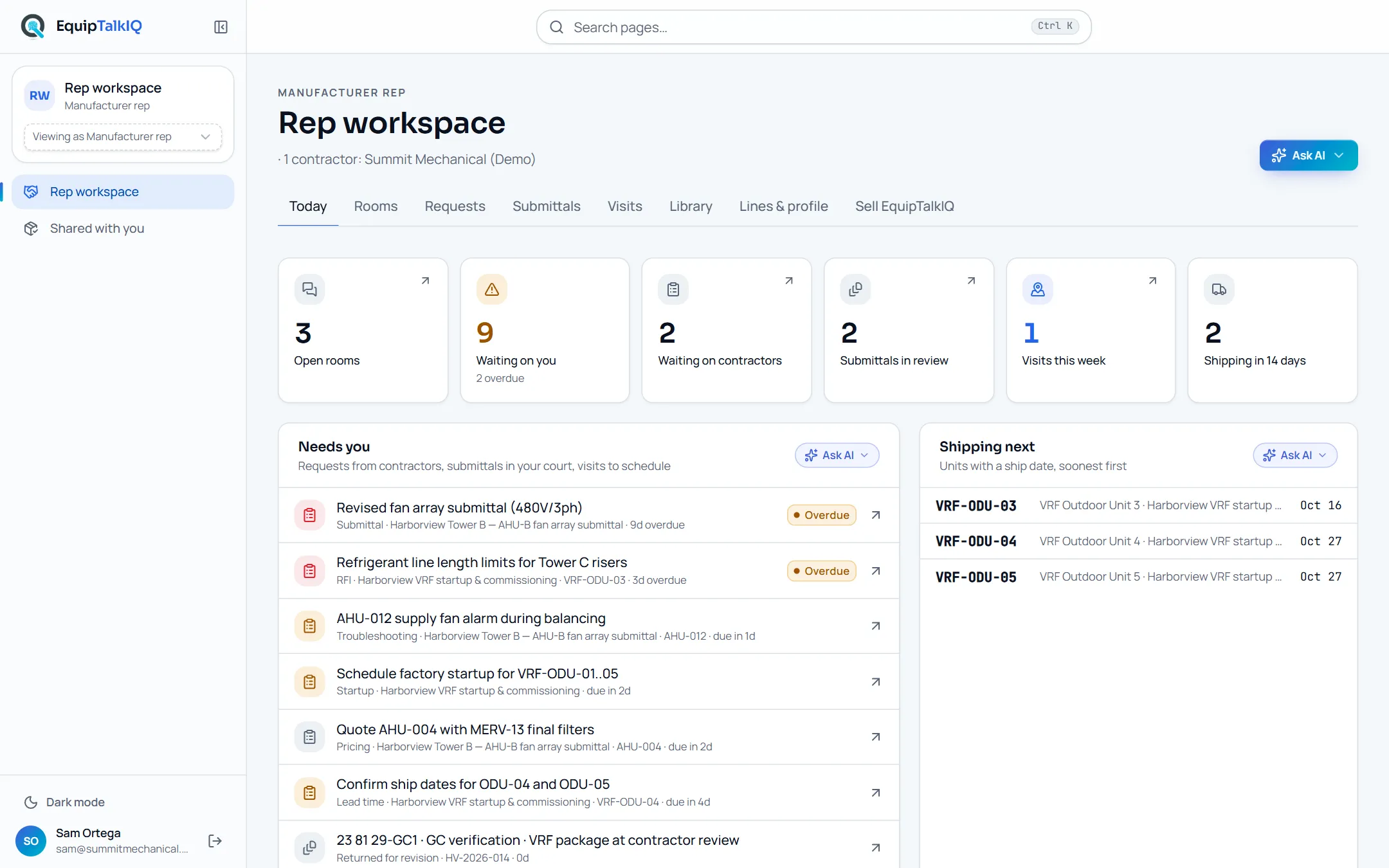
Manufacturer reps
Rooms with the contractors you supply: the equipment schedule, submittals, documents, startup and commissioning visits, and an assistant over your rooms.
See the reps view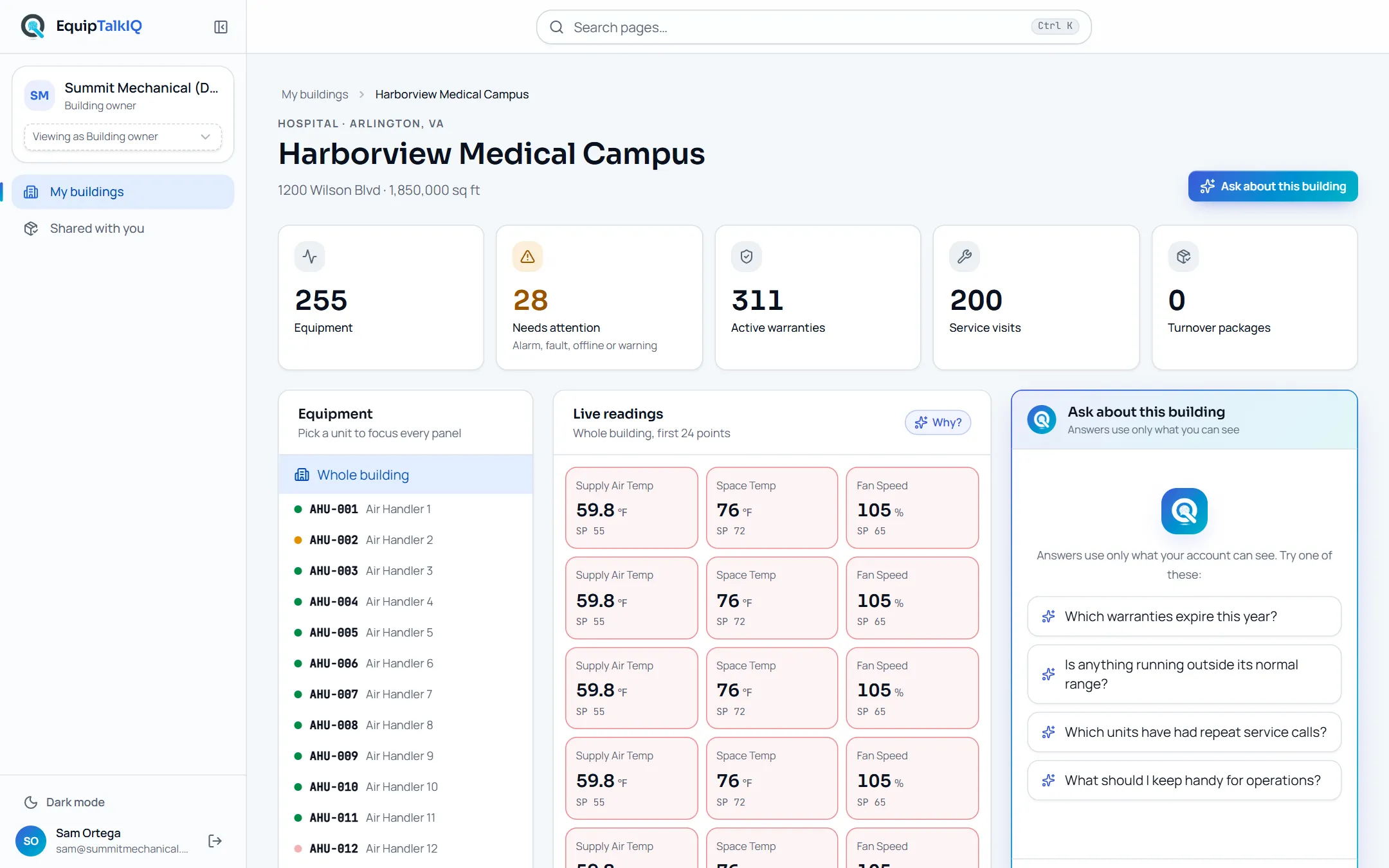
Building owners
A living twin of each building: equipment, readings, warranties, completed service and turnover documents.
See the owners view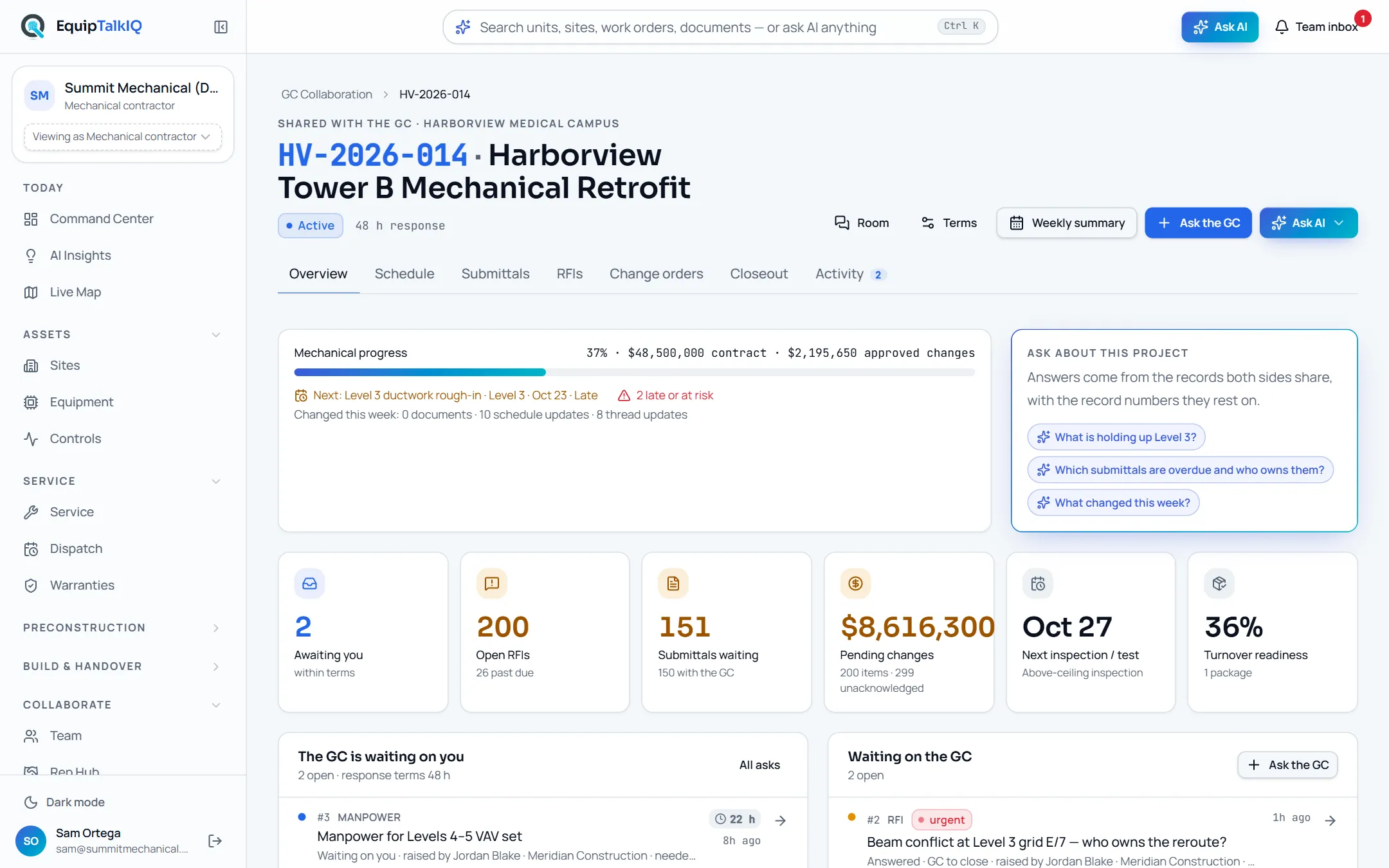
General contractors
A workspace per project: schedule, submittals, RFIs, change orders, closeout and tracked asks, with a weekly summary and an assistant that sees only that project.
See the gcs viewFROM THE FIELD. FOR THE WHOLE TEAM.
The equipment.
The evidence.
The whole story.
A technician’s note. A controls engineer’s observation. A service agreement. Keep it all connected to the unit, and to the next person who needs it. On a phone the shell is a tab bar with Ask in the middle; in a control room it runs in dark mode.
Book a demoEQUIPTALKIQ × AXIOM ROUTING
Your operation
isn’t off the shelf.
EquipTalkIQ provides the mechanical foundation. Axiom Routing, the company that builds EquipTalkIQ, adds the data ingestion, applied AI, and customer-specific workflows around the way your business actually works.
Meet Axiom RoutingStart with the work, not the software.
Map your systems, your people, and the decisions that get lost between them. Identify useful source records, access boundaries, and the first workflow to improve.
EVIDENCE BEFORE CONFIDENCE
A useful answer has a foundation.
Start with the audience and the asset. Retrieve relevant information. Make uncertainty visible. Keep the next decision with the person responsible.
Begin inside the right boundary.
Identify the account audience and the company, project, site, or equipment it can access.
Context with boundaries
Company and account access shape which records can support an answer.
Sources worth reviewing
SpecLens connects spec answers to section, page and paragraph with a verified quote for human review.
People decide
AI assists analysis and drafts suggestions. It does not approve engineering, write a schedule by itself or operate equipment.
Less scrolling past.
More figuring things out.
Mechanical ideas worth exploring. Evidence you can follow. Perspectives you can switch. A journal that puts the work in your hands.
Interactive readOne equipment tag. A whole building story.
Why a service note, a submittal, and an operating point tell a better story together—and where AI should stop.
Explore the storyInteractive readWhat should happen before AI answers?
Follow a question from account access to relevant records, a grounded response, and the next team action.
Explore the storyInteractive readA takeoff number needs a chain of evidence.
Explore drawing revisions and the difference between recognized symbols, measurable geometry, and reviewed quantities.
Explore the storyTHE THINGS WORTH ASKING
Clear answers.
No shortcuts.
What you can explore today, what’s evolving, and what still needs a connection.
Document tools for MEP contractors answer questions from drawings, specs and contracts, compare revisions and keep submittal logs, and they stop when the job is won. EquipTalkIQ does that preconstruction work (cited spec answers, submittal logs, addenda tracking, revision compare) and keeps the same record of every unit through construction, turnover, service, dispatch, warranties and live controls, with sources on every answer.
THE RECORD OUTLASTS THE PROJECT
Win the job with cited answers.
Then keep the building talking.
Explore EquipTalkIQ with sample project data: takeoff, specs, planning, turnover, service, dispatch and controls.
Bring your questions. Follow the sources.